
To support informed decision-making, underwriters require diverse analytics sets, where balancing speed and quality is paramount for success.
These analytics include marginal impact analysis, to help understand how taking on additional risk would impact the potential losses of an existing portfolio.
Underwriting a single account composed of dozens to thousands of locations presents unique challenges to marginal impact analysis and pre-bind workflows. The locations for a single account may be spread across multiple regions, lines of business, or underwriting groups. Each location may have its own view of risk based on historical loss experience, or the inclusion/exclusion of specific perils and sub-perils.
Underwriters must utilize the correct view of risk; otherwise, firms risk being exposed to unexpected losses and potentially underinsured for the true amount of risk exposure.
To help streamline account underwriting and satisfy the increasing need for a granular view of risk, we’re excited to announce that Workflow Builder will be available in Moody's UnderwriteIQ™ application after the March 2025 release.
Workflow Builder is set to address these unique challenges around the speed and quality of analytics required to support account underwriting workflows and raise the bar for underwriting efficiency with new levels of flexibility and customization.
The leap from UnderwriteIQ Analysis Templates to Workflow Builder
In 2023, Moody’s introduced Analysis Templates to support marginal impact analysis of individual risks against reference portfolios. By leveraging the shared architecture of UnderwriteIQ and Risk Modeler™ on Moody’s Intelligent Risk Platform™, admins could significantly simplify the process in comprehending the impact of complex risks, such as those in excess and surplus lines, against a reference portfolio using Moody’s RMS catastrophe models.
This is accomplished by comparing modeled losses against carefully curated views of risk developed by a firm’s Chief Risk Officer, Chief Underwriting Officer, and Head of Exposure Management. Workflow Builder enhances the capabilities of Analysis Templates to provide greater flexibility, efficiency, speed, and quality for account underwriting, by delivering key insights, such as regional marginal impact analysis, for hundreds or even thousands of risks in a single workflow.
With the Workflow Builder, you can:
- Increase your analysis efficiency by quickly and accurately creating preconfigured workflows: The Workflow Builder user interface provides a useful guided experience to help complete the steps required to create a preconfigured workflow. In addition, Workflow Builder presents helpful information about available services, to help the user select the correct services and settings for the analysis.
- Model loss grouping and marginal impact flexibility: With Workflow Builder, you can create customized modeled losses groupings to create bespoke risk views and loss perspectives.
- Build unique loss perspectives: Workflow Builder allows you to create different individual and grouped marginal impact perspectives.
Creating preconfigured workflows using Workflow Builder
Taking advantage of the familiar and intuitive UnderwriteIQ experience makes creating a preconfigured workflow fast and easy. Once the workflow has been built, underwriters can seamlessly integrate the new templates into their daily operations within UnderwriteIQ.
Here are the steps:
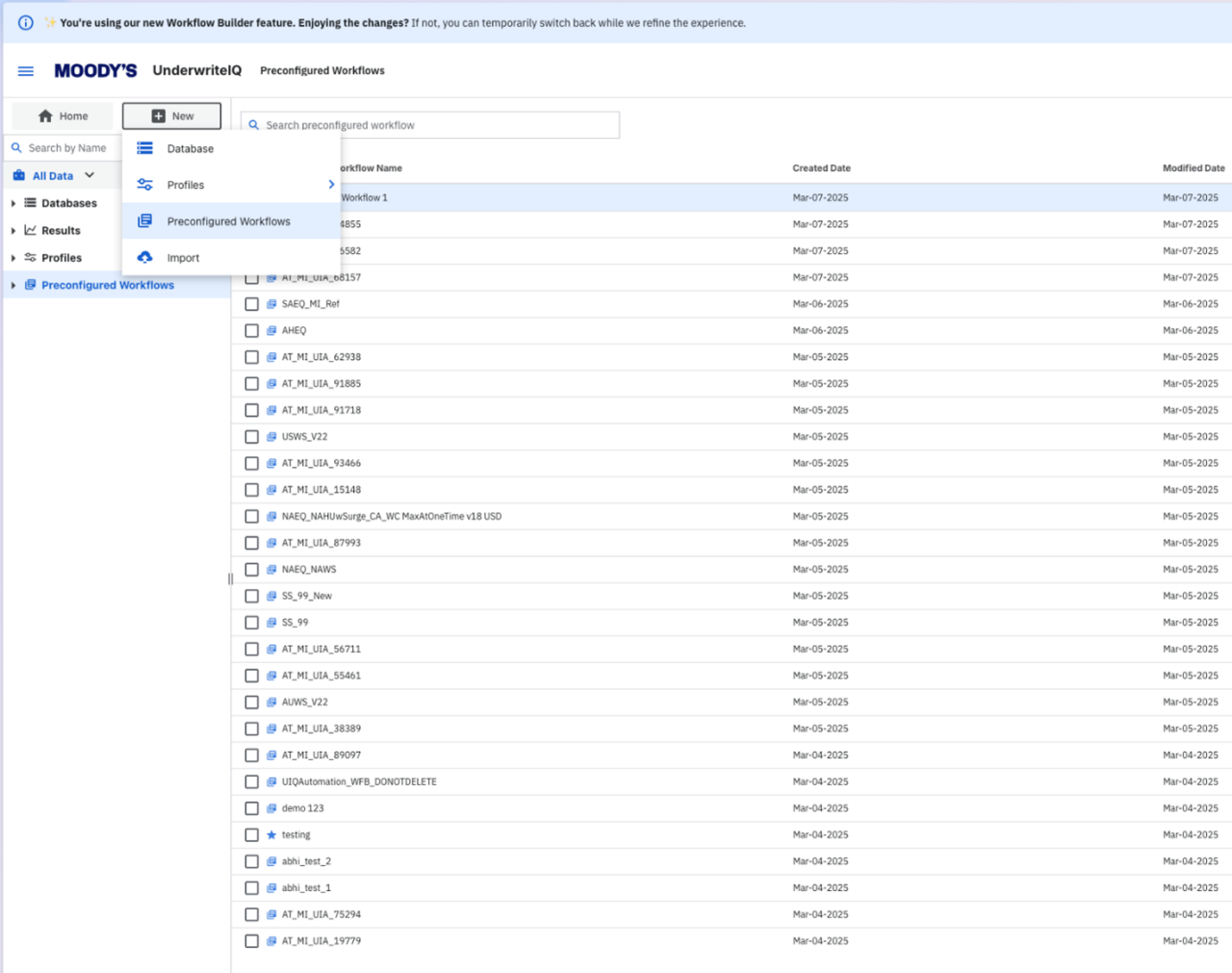
Step 1: Launch Workflow Builder by clicking on the preconfigured workflow option in the new launcher
Step 2: Select model profiles
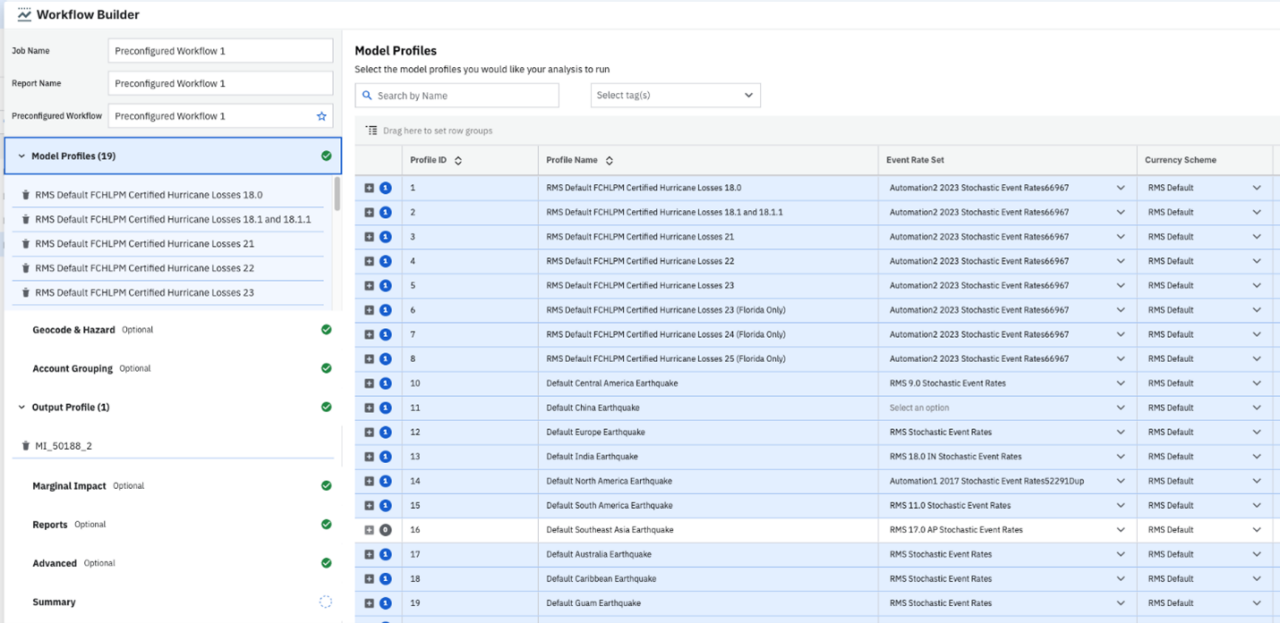
Using tags to filter a list of model profiles helps locate the right model profile and reduce administrative overhead when creating analyses. Cat modelers can add multiple, unique tags to profiles, such as specific lines or defined underwriting groups. You can also search model profiles by name, sort the model profile table by columns, and group them by columns to make your search easier.
Model profile characteristics and settings are displayed on the right panel, giving you valuable information to help you select the correct model profiles to include in your analysis.
Step 3: Select geocoding and hazard retrieval options (Optional)
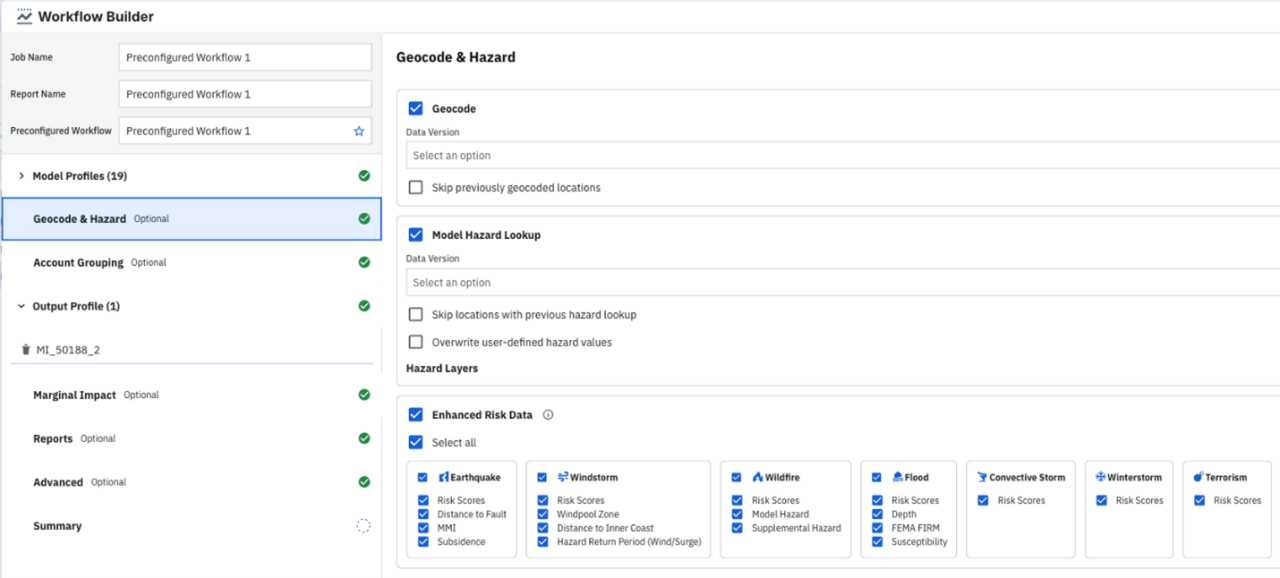
Workflow Builder allows you to select your preferred geocoding engine back to Version 18.
Step 4: Create account groups (Optional)
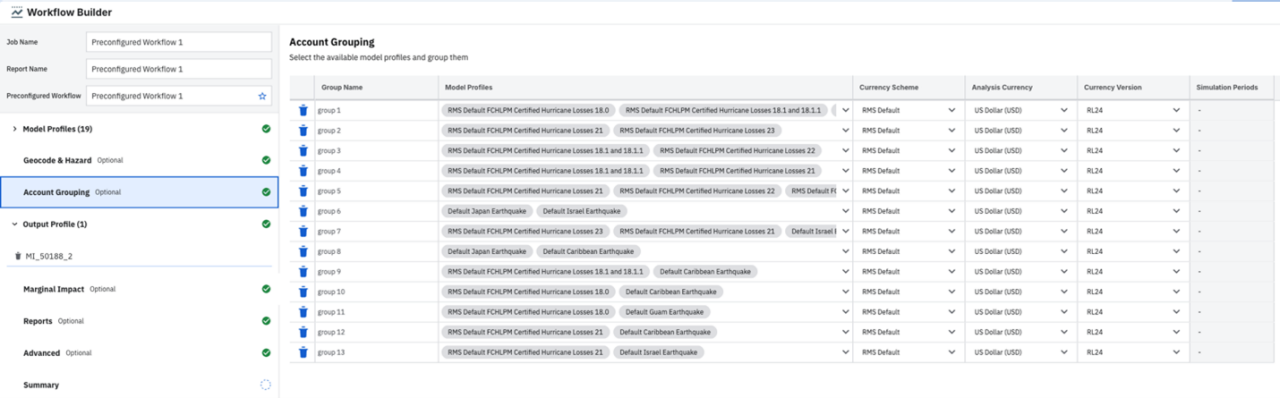
Account grouping allows you to group loss results from your individual loss analyses to facilitate creating multiple risk views. Users can also adjust the currency schema, the analysis currency, and currency version.
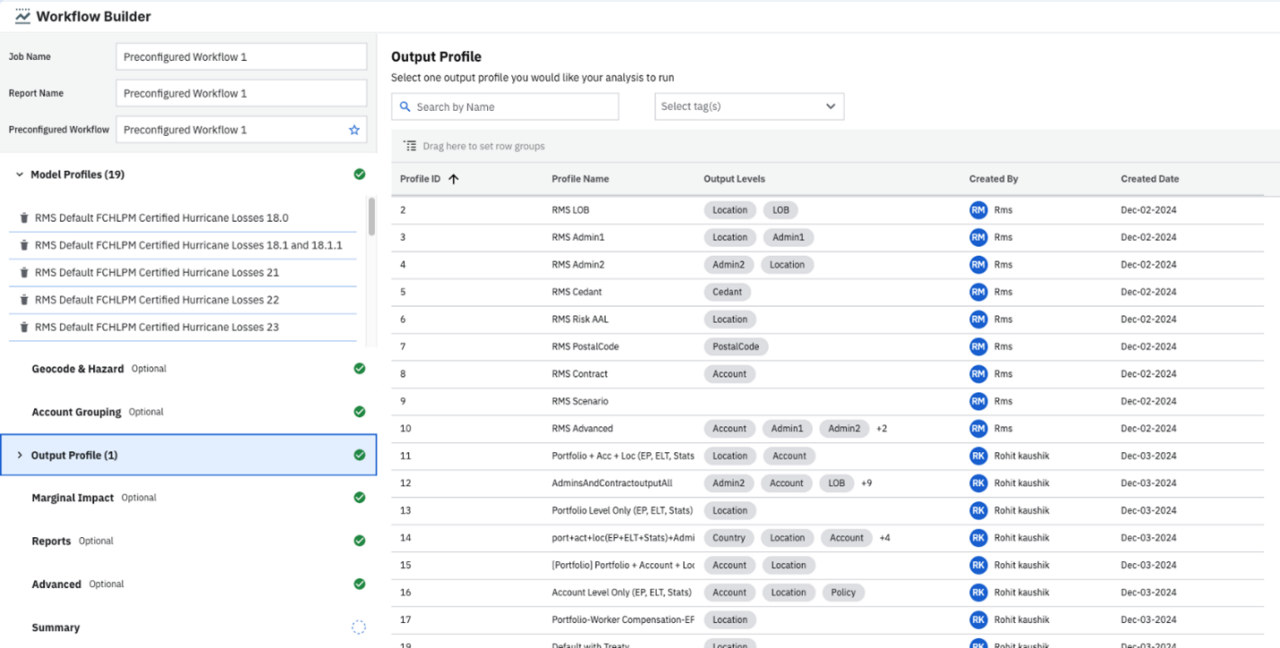
Step 5: Select an Output Profile
The Output Profile determines granularity, loss type settings, and financial perspectives for an analysis. Granularity options including account, policy, and location. Loss type settings include statistics, exceedance probability, and loss tables. Finally, we allow 27 financial perspectives including ground-up loss, gross loss, and net loss pre-cat.
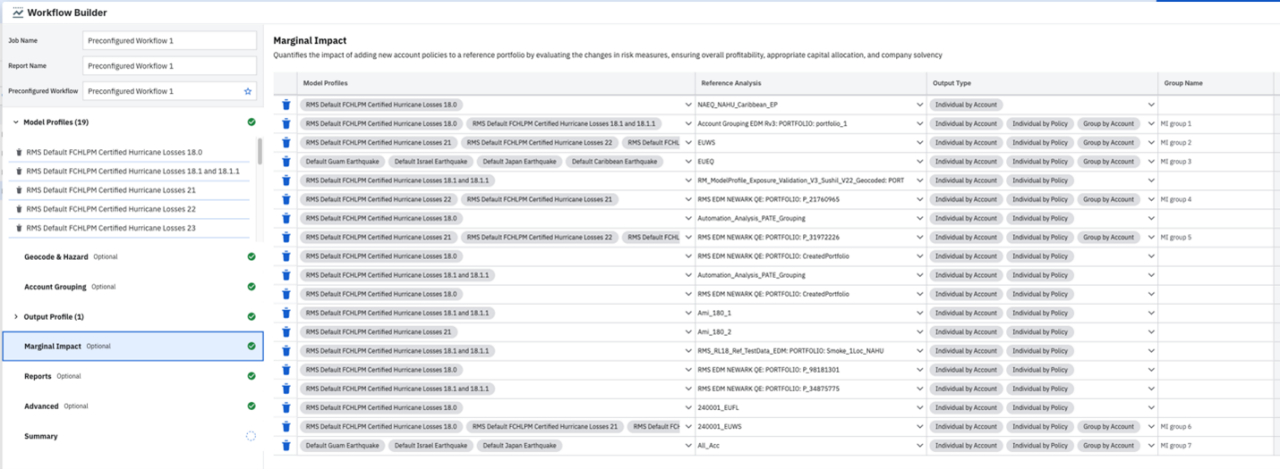
Step 6: Create marginal impact analyses
Once you’ve set up the model profile, Workflow Builder allows you to flexibly create marginal impact analyses by assigning a model profile to a specific reference portfolio. In addition, you can create bespoke marginal impact groups and associate them with specific reference portfolios, to calculate the combined marginal impact from multiple losses on a reference portfolio.
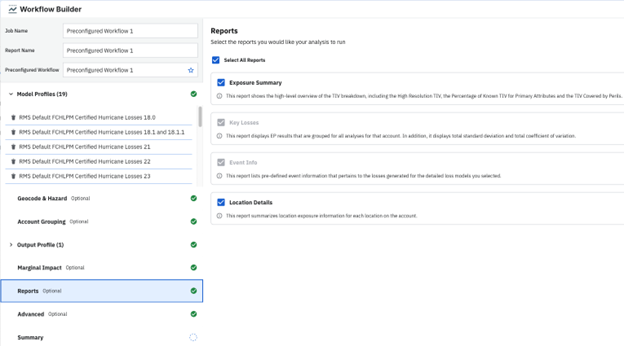
Step 7: Select reports to be included in the analysis
Workflow Builder includes multiple mandatory and optional reports, so you can select the reports to include in your analysis:
- Exposure summary (optional): This report provides a high-level overview of the total insurable value (TIV) breakdown, including high-resolution TIV, percentage of known TIV for primary attributes and TIV covered by perils.
- Key losses (mandatory): This report displays the exceedance probability (EP) results grouped for all analyses for that account. It also displays total standard deviation and total coefficient of variation.
- Event information (mandatory): This report lists pre-defined event information that pertains to the losses generated for the detailed loss models you selected.
- Location details (optional): This report summarizes location exposure information for each location on the account.
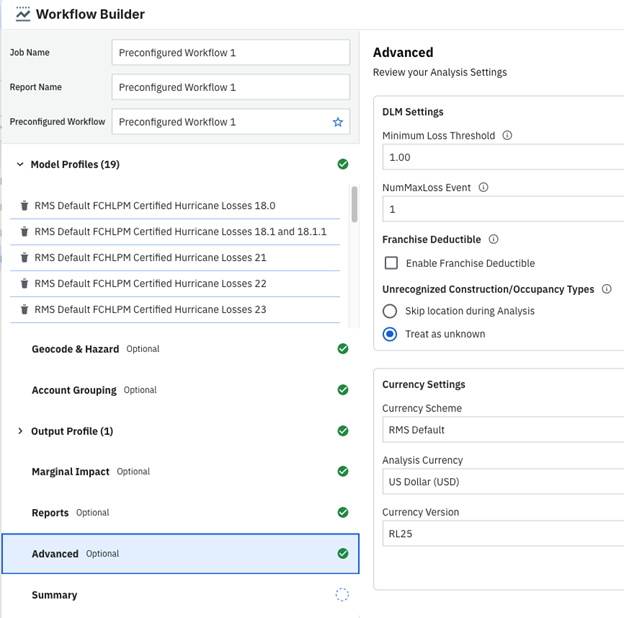
Step 8: Set additional analysis settings
You can fine-tune additional analysis settings, including detailed loss model (DLM) settings such as the minimum loss threshold, number of maximum loss events, and whether to apply a franchise deductible. In addition, you can set currency settings.
Step 9: Review your analysis selections in the summary step
The final step of the Workflow Builder experience presents you with a summary of the services and settings of your preconfigured workflow, so you are confident about your preconfigured workflow selections. From here, you can jump to any of the previous sections to make edits.
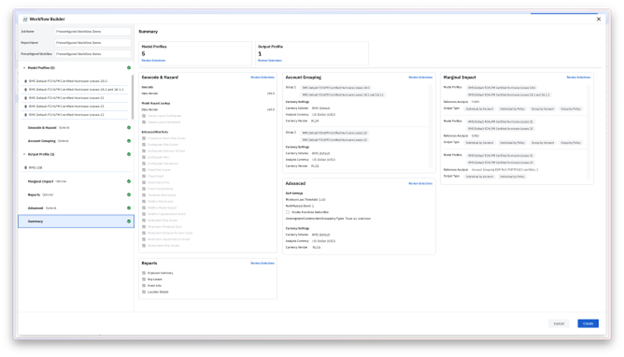
Step 10: Give your preconfigured workflow a name
Name your preconfigured workflow in the field in the top left menu. Optionally, set the job and report name, to easily keep track of your reports.
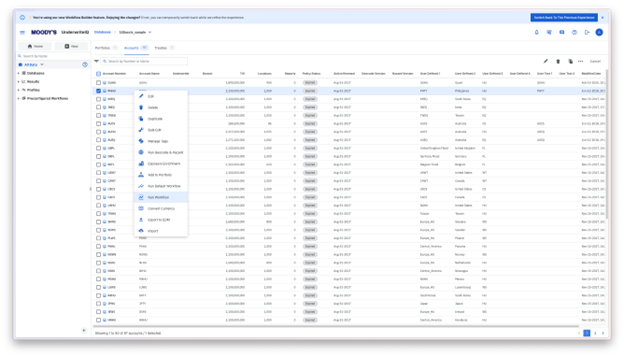
Step 11: Create the preconfigured workflow and run an account against it
You can do this by right clicking on an account and selecting the ‘Run Workflow’ right-click context menu item.
Conclusion
Workflow Builder is just one of the innovations on the Intelligent Risk Platform designed to enhance our clients' underwriting workflows. For underwriting accounts with locations spanning across multiple insurance markets, Workflow Builder eliminates numerous time-consuming manual steps commonly encountered in the pre-bind workflow. Underwriters can respond to opportunities faster and more confidently, ensuring their business aligns with risk thresholds.
To learn more about how UnderwriteIQ can help you streamline the account underwriting workflow with increased speed and confidence, please get in touch.
LEARN MORE
Moody's insurance solutions
Our differentiated solutions bring together technology, data and analytics and insights, helping insurers, reinsurers, and brokers address their most complex challenges and make better decisions with confidence – therefore helping to close the insurance gap and drive performance.